Service desk
Let Your Whole Team Answer Service Desk Tickets, Without Buying More Agent Seats
Here’s a situation every JSM admin recognises. A customer raises a ticket about a billing export that’s failing. The person who actually knows the answer is a developer on the product team. She can see the ticket, she knows exactly what to tell the customer, and she can’t reply to it, because she isn’t a licensed service desk agent.
So one of two things happens. Either she writes the answer in Slack and a real agent copy-pastes it onto the ticket (slow, and now two people did one person’s job), or you buy her an agent seat she’ll use four times a year. Multiply that across every developer, sysadmin, team lead, and finance approver who occasionally needs to touch a ticket, and the maths gets ugly fast.
That’s the problem Proxy Agent (by QwertyCraft) is built to solve. This post is about the licensing trap itself, and how the app sidesteps it.
Why this costs so much
Jira Service Management is priced per agent. An agent is anyone who works tickets: replies to customers, transitions issues, edits requests. Your regular Jira users (developers, PMs, the rest of the company) don’t count against that bill, and they also can’t do any of those things on a service desk ticket. That’s the whole licensing model in one line: if you want to act on a service desk ticket, you pay for a seat.
The trouble is that the set of people who could usefully help on a ticket is much bigger than the set of people you want to pay agent seats for. The developer with the real answer. The sysadmin who already fixed the thing and just needs to tell the customer. The team lead covering an evening when the two on-shift agents are slammed. The manager who approves a purchase request. None of them live in the support queue full-time. Paying a full agent seat for each is hard to justify, so most of them just… don’t help, and the queue backs up behind your handful of licensed agents.
There’s a second, quieter problem too: identity. Even when someone can reply, you don’t always want the customer to see “Dave from Platform Engineering” on the ticket. You want a consistent, recognisable “Support” voice, no matter who’s actually behind the keyboard.
What Proxy Agent actually does
The idea is simple. Give a normal Jira user (no agent seat) permission to act on a service desk ticket on behalf of an agent identity. They can post comments, move the ticket through its workflow, edit fields, update links, and log time, all without ever holding a JSM agent license themselves.
The customer never sees the stand-in. Every action is attributed to one of two identities you choose:
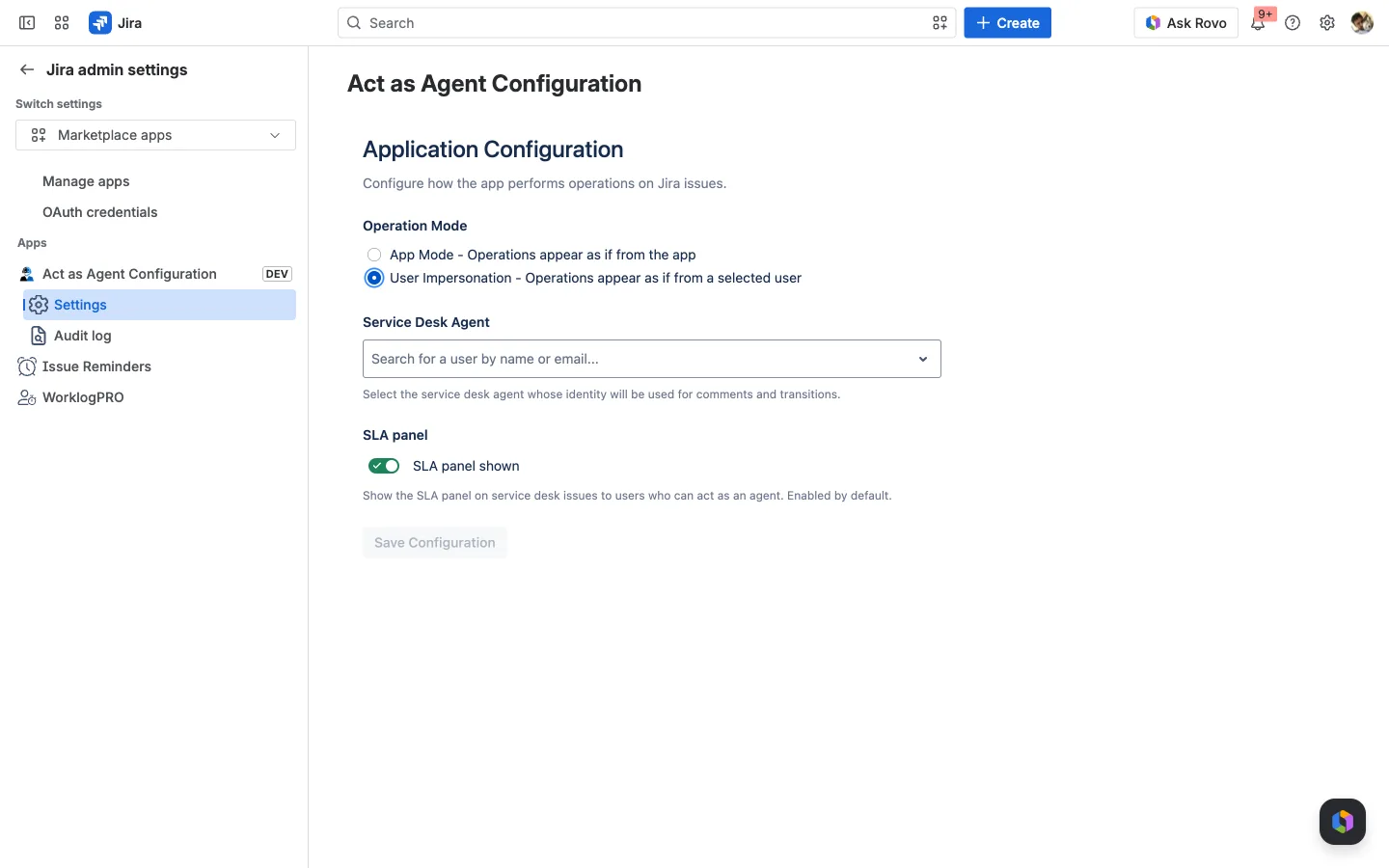
- A named service desk agent (the app calls this User Impersonation): pick one agent user, and every action shows up under their name and avatar. Customers see one consistent “agent” no matter who clicked.
- The app itself (App Mode): actions are attributed to the “Proxy Support Agent” persona, with its own name and avatar. Nobody’s individual identity is exposed at all.
You set that once on the app’s Settings page. App Mode is the anonymous default; switch to User Impersonation and you pick the agent whose identity gets used.
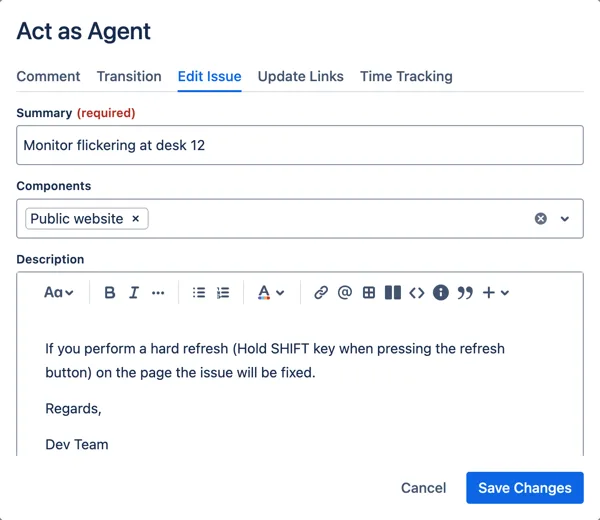
On a ticket, anyone you’ve authorised gets an Act as Agent action. It opens a small modal with tabs for the things agents do (Comment, Transition, Edit Issue, Update Links, and Time Tracking), each using the normal Atlassian editors and pickers. They write the reply, hit submit, and it lands on the ticket under the configured identity.
What the customer sees
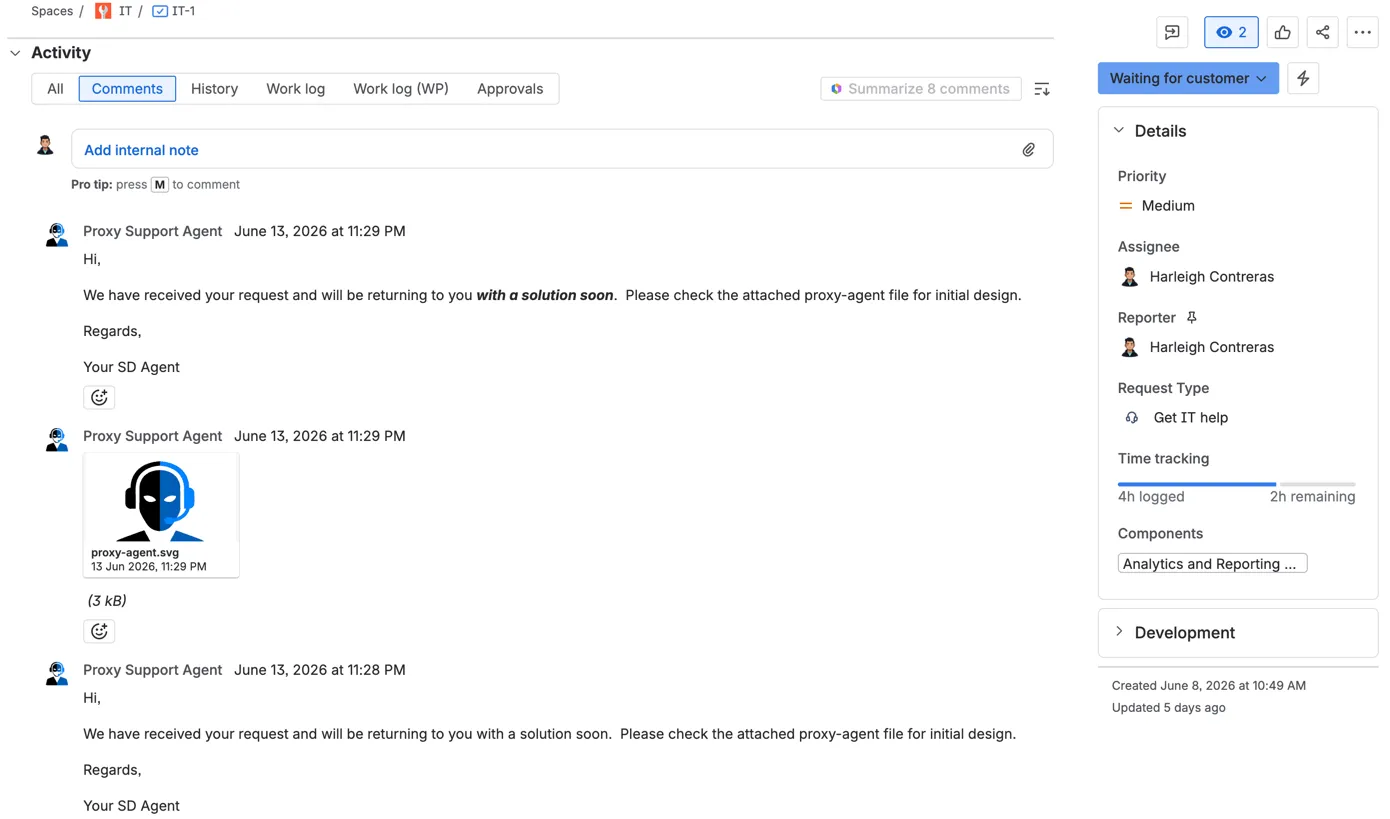
This is the part that makes it click. On the ticket below, the assignee and reporter are both real people, but every customer-facing comment is authored by Proxy Support Agent, the app’s persona, not by whoever actually typed it.
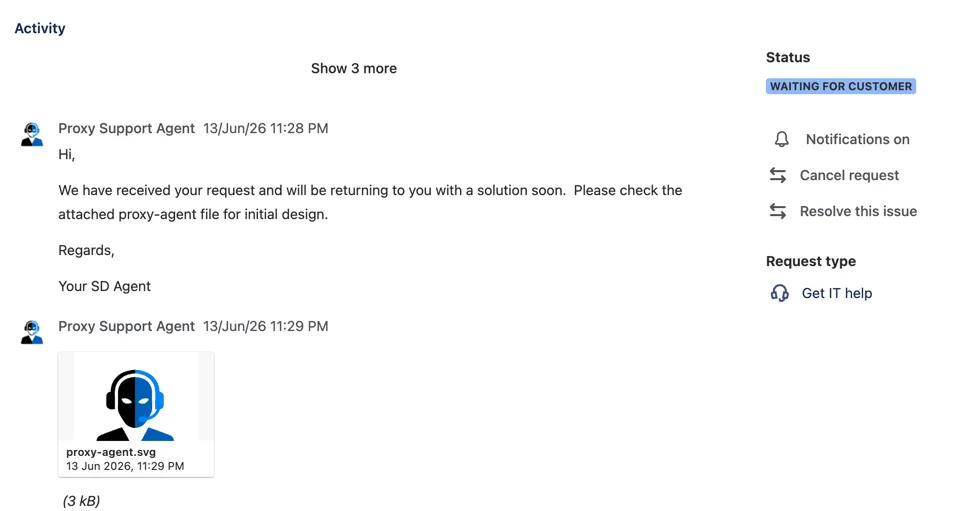
So your developer answers the billing question directly, the customer gets a fast, authoritative reply from “Support,” and you didn’t buy anyone a seat to make it happen. If you’ve got a thousand Jira users, a thousand people can now pitch in on tickets when they’re the right person to, while your agent count (and your bill) stays where it is.
It’s controlled, not a free-for-all
Letting non-agents act on tickets sounds alarming until you see how it’s gated. Proxy Agent adds a dedicated Jira project permission, Act as Agent, and the action simply doesn’t appear for anyone who doesn’t hold it.

Because it’s a standard permission scheme entry, you scope it exactly like any other Jira permission: a specific role, a named group like service-desk-leads, or a per-issue condition such as Current Assignee so people can only act on tickets actually routed to them. And it doesn’t override Jira’s normal checks: if a user couldn’t post a public reply or log work the regular way, they can’t do it here either. It’s an extra gate, not a bypass.
Anonymity outside, accountability inside
The bit that keeps your auditors happy: the customer sees the persona, but internally nothing is hidden. Every action runs through a built-in audit log that records the real person who clicked, what they did, which identity it was attributed to, the issue, and whether it succeeded.
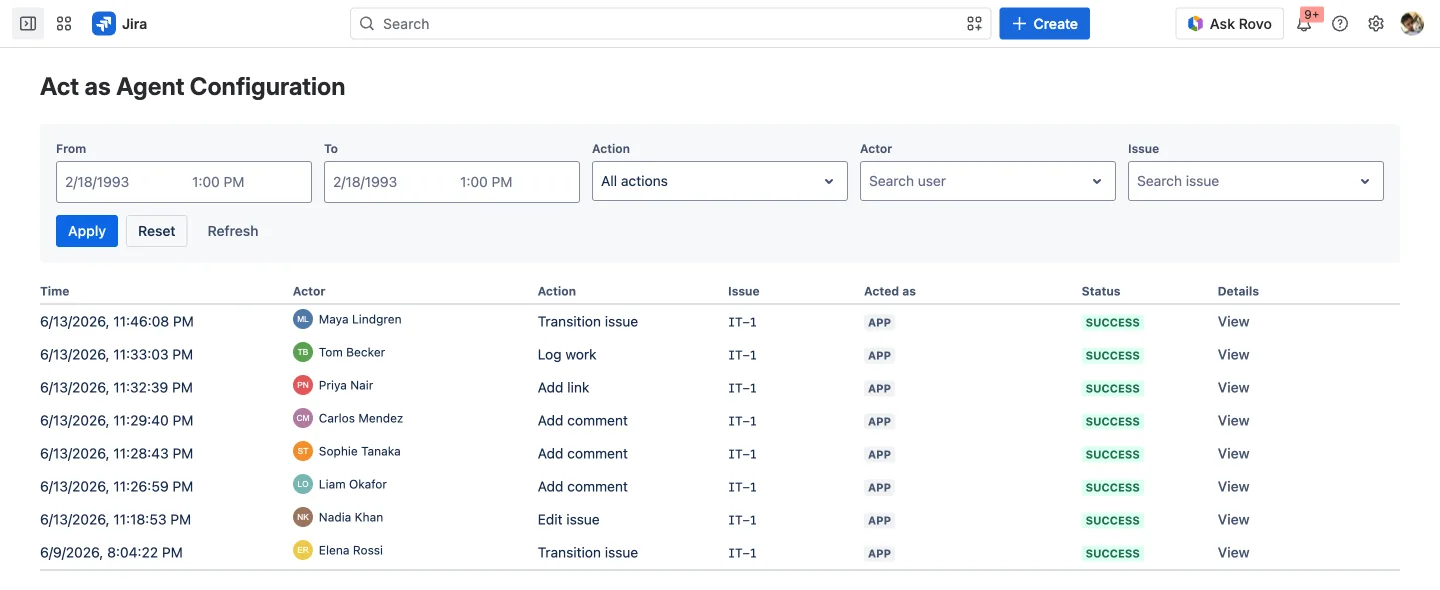
So “anonymous to the customer” and “fully attributable to your team” are both true at once. Records sit inside your own Atlassian tenant and age out automatically after 90 days. There’s an audit view on the global admin page and one scoped to each project.
A small but thoughtful extra: agents normally rely on SLA timers, which non-agents can’t see. Proxy Agent shows an SLA panel to the stand-in on the ticket, so the person helping out still knows how much time is on the clock.
Where it fits, and where it doesn’t
This isn’t a replacement for your service desk agents, and it’s worth being blunt about that. Proxy Agent lets a non-agent perform a defined set of ticket actions (comment, transition, edit fields, update links, log time) under an agent identity. It does not turn anyone into a service desk agent, and it doesn’t try to. If someone works the queue all day, license them; they should have the native agent experience. It’s a Forge app, so the data stays inside Atlassian, and it ships in fourteen languages.
A licensed JSM agent still gets a whole product the app deliberately doesn’t replicate. Things only a real agent can do:
- Work the queues. Browsing, filtering, sorting, and picking up tickets from JSM queues, an agent’s home base. The app acts on one ticket at a time from the normal issue view; there are no queues and no bulk queue actions.
- Own tickets as the assignee. Real agents are assignable: they appear in assignee pickers, carry a workload, and get assignment notifications. A stand-in acts on a ticket without ever becoming an assignable agent.
- See the full SLA picture. Agents track SLA timers, goals, and breaches across every queue and in reports. The app surfaces the SLA only on the single ticket a stand-in is viewing, handy but not the queue-wide view.
- Run the knowledge base. Writing and maintaining KB articles, and the article suggestions agents get while replying.
- Manage customers and organizations. Adding and organising customers, organizations, and request participants: the people side of the service desk.
- Use reports, dashboards, and CSAT. Created-vs-resolved, SLA-success, and customer-satisfaction analytics are part of the agent product.
- Handle operations and incidents. On-call schedules, alerting, and major-incident response (JSM’s operations features).
- Live in the agent experience. The mobile agent app, the internal-note stream,
@mentions, canned responses, request approvals, and the rest of the day-to-day tooling that comes with a seat.
So keep licensing the people who actually run the desk. Proxy Agent is for everyone around them (the developer, the sysadmin, the approver) who only occasionally needs to act on a ticket and shouldn’t cost a full seat to do it.
The licensing comparison is the easy part. A JSM agent seat is billed per agent, every month, forever. The app is billed as an app, and one subscription covers everyone you grant the permission to. Here’s the monthly maths: a JSM Standard agent seat for each person who needs to act on tickets, versus one Proxy Agent subscription that covers all of them.
| People acting on tickets | JSM Standard / mo | Proxy Agent / mo | You save / mo | Saving |
|---|---|---|---|---|
| 10 | $250 | $10 | $240 | 96% |
| 50 | $1,031 | $90 | $941 | 91% |
| 100 | $1,969 | $180 | $1,789 | 91% |
| 250 | $3,852 | $435 | $3,417 | 89% |
| 500 | $6,000 | $835 | $5,165 | 86% |
| 1,000 | $10,130 | $1,635 | $8,495 | 84% |
| 10,000 | $78,700 | $10,085 | $68,615 | 87% |
| 50,000 | $335,500 | $22,035 | $313,465 | 93% |
Cloud, monthly, list price in USD, as of June 2026, read from Atlassian’s own pricing calculators. JSM Standard is volume-priced per agent ($25/agent at 10 agents down to $6.71 at 50,000); Proxy Agent is priced on total Jira users. The comparison assumes each of those people would otherwise need an agent seat, which is exactly the point: occasional responders shouldn’t. Prices change, so check the Marketplace listing before you bank on a number.
Try it on your own Jira. Find Proxy Support Agent on the Atlassian Marketplace, grant the Act as Agent permission to a role that needs it, and have a non-agent answer their first ticket.